Workshop Primer
HALO
Harmonizing Asymmetric Multi-core Architectures with Linked communication for Optimal design
A model-driven workflow for describing heterogeneous systems, validating communication intent across domains,
and generating portable and platform-specific implementation artifacts from one unified model.
CHALLENGES
Typical Problems in SoC Environment
Resource Management
Efficient allocation and management of shared resources in between cores is crucial to prevent bottlenecks and ensure optimal performance
Latency
Minimizing the communication delay between cores is essential for maintaining real-time processing and system responsiveness
Scalability
As the number of cores increases, the system must efficiently scale to handle additional processing power without compromising performance
Costs
The complexity and integration of multiple cores in an SoC can lead to increased design, development, and production costs
Inter-Core Exchange
Ensuring seamless and reliable data exchange between cores is vital for collaborative processing tasks across different software
Design
The architectural design of an SoC must balance performance, power consumption, and complexity to meet specific application requirements
SOLUTIONS
Available Solutions for Describing AMP SW Architecture
Custom
Ad-hoc or company-specific modeling environments built using Domain-Specific Languages (DSLs) or UML profiles.
AADL
Industry standard for safety-critical multicore systems; supports processor and partition allocation.
RAPIDE, EADL, COCODEL
Historical academic roots of current architecture modeling formalisms - event-based interactions and data-flow modeling
MARTE
Visual modeling of real-time tasks on heterogeneous/AMP systems - express timing constraints, task mappings, and resource utilization
OS Redesign
Runtime or operating system-level approaches that modify the kernel or partition manager to better support AMP communication and scheduling.
EAST-ADL
Supports layered abstraction and mapping to AUTOSAR components in multicore ECUs - mapping to AUTOSAR components deployed across multicore ECUs
IMPLEMENTATION
Current Available Solutions for IPC
Custom
Ad-hoc shared-memory or message-queue mechanisms developed for specific SoCs or RTOS environments.
RPMSG
Standard Linux-based protocol within OpenAMP, providing lightweight message-passing between heterogeneous cores
MCAPI
Formal Multicore Communications API standard defining messages, packets, and scalars for embedded systems
Virtualization
Hypervisor-based IPC through shared memory and event channels (e.g., Xen, Jailhouse)
OS Redesign
Custom RTOS or kernel modifications aimed at deterministic inter-core communication and timing predictability
OpenAMP
Framework combining RemoteProc (core management) and RPMsg (messaging). Widely used for Linux + RTOS AMP platforms
HALO UNDER THE HOOD
HETEROGENEOUS SOFTWARE MODEL - HSWM
HSWM is a software model integrating different programming paradigms, languages, or frameworks within a single system.
THE HALO FRAMEWORK APPROACH
HALO is a model-driven approach for describing and implementing heterogeneous systems which consists of three main phases: describe, configure, and generate.
DESCRIBE
Describe the heterogeneous software model using an Architecture Description Language.
CONFIGURE
Configure and allocate resources inside the heterogeneous software model.
GENERATE
Generate the source code (HALO framework) previously described and configured.
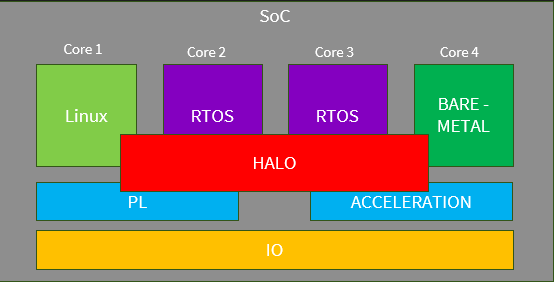
Image shows processing cores (Core 1 runs Linux; Core 2 and Core 3 run an RTOS; Core 4 runs bare‑metal code) and programmable logic / accelerators.
HALO framework provides a common layer that lets these different runtimes communicate.
In short: HALO bridges software on diverse cores to shared hardware resources and accelerators.
Motivation
Why HALO Exists
Heterogeneous systems example
Linux applications, RTOS tasks, bare-metal firmware, and accelerator logic all need to exchange data reliably.
Communication intent gets fragmented
Architecture diagrams, memory maps, code, and protocol assumptions often live in different places and drift apart.
HALO makes the contract explicit
Architecture, interfaces, and hardware/mapping are modeled separately and then composed into one system view.
The central idea is simple: stop rewriting the same integration knowledge in multiple notations and let the model become the source of truth.
Meta Model
The HALO Concept
ADL - Architecture Description Language
System Architecture
Describes Components, platforms, functions, and logical connections between endpoints.
IDDL - Interface Definition Description Library
Data Types
Provides a library of pre-defined data structures used by interfaces. Definitions can be reused across multiple interfaces.
IDL - Interface Description Language
Interfaces
IDL defines the interfaces between components, focusing on the data being exchanged with access and integrity rules.
HML - Hardware Mapping Language
Hardware Mapping
HML defines the profile of how components exchange data, focusing on the data placement, synchronization and transfer behaviour.
HML profile is mapped uniquely to the ”communication” type defined in ADL.
HMML - Hardware Module Mapping Language
Hardware Mapping Library
Contains various descriptions of profiles which can be imported into HML.
HALO is strongest when these concerns stay separate during authoring and become unified only during composition.
Example
HALO Domain Specific Language (DSL) Inputs
ADL Snippet
MySystem {
	components {
		Core1 : Component {
			Type: Application,
			Platform: Linux,
			Function: GeneralProcessing
		}
		Core2 : Component {
			Type: Application,
			Platform: FreeRTOS,
			Function: RealTimeProcessing
		}
	}
	connections {
		connection LinuxToRTOS {
			from Core1 to Core2
			interface: TstIf_1
			profile: sharedMemoryProfile1
		}
	}
}
IDL Snippet
include *.iddl
interface TstIf_1 {
  access {
    read { SharedData SharedData2 }
    write { SharedData SharedData2 }
  }
  integrity {
    crc16 { SharedData2 }
  }
}
IDDL Snippet
dataStructures {
    SharedData {
        integer cnt
        integer dataId
        byte dataPayload[1024] = 0
	  }
    SharedData2 {
        integer dataPayload[1024]
    }
}
HML Snippet - with overrides
#include *.hmml
SharedMemory sharedMemoryProfile1 {
  memSize: 4MB
  baseAddress: 0xA0000000
}
HMML Snippet
Profiles {
	SharedMemory {
		memSize: 64MB
		baseAddress: 0x80000000
		cacheable: True
		policy: WriteBack
		cacheLine: 64B
		coherence: Software
		syncType: AcquireRelease
		permissions: RW
		priority: High
		syncBlocking: True
		syncPrimitive: mutex
	}
}
UML View
HALO UML Inputs
Components
HALO components represented as UML classes with component stereotypes and attributes such as type, platform, and function.
Interfaces + Data
Interfaces are UML interface-like classes with operations for read, write, and integrity rules, while referenced structs become data-type classes.
Profiles + Connections
Profiles are stereotyped UML classes, and connections are represented as association classes linking source and destination components.
If DSL Inputs are the "source code" of HALO, then UML artifacts will be generated for analysis and visualization in UML tools.
UML Artifacts
- architecture.puml - PlantUML model of the architecture
- interfaces/*.puml - PlantUML views of the interfaces
- profiles/*.puml - PlantUML views of the profiles
- halo_model.uml - UML model of the HALO system (importable into UML tools)
- halo_profile.xmi - XMI representation of the HALO profiles (for UML tools)
The UML/XMI representation lets HALO describe the same system in a notation that is comfortable for model-driven engineering, tool exchange, and architecture reviews.
HALO DSL <-> UML
HALO Inputs Overview
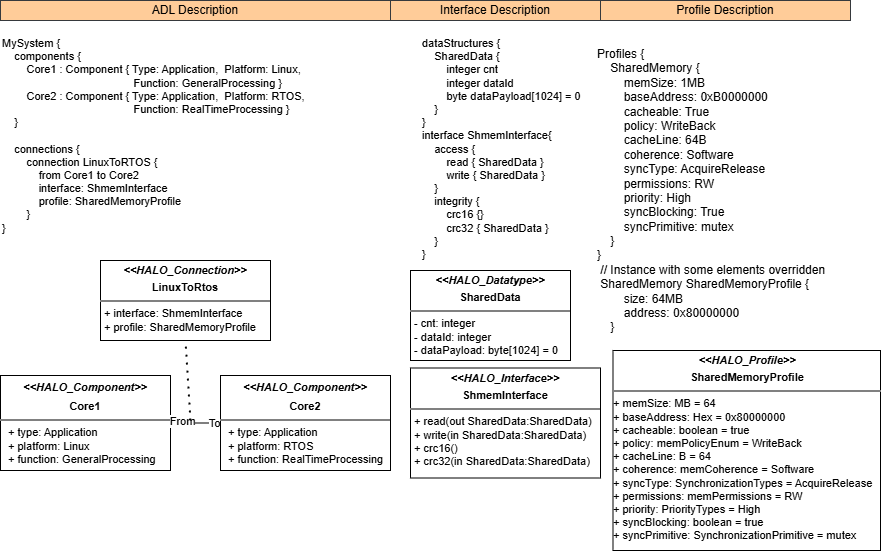
This diagram visualizes the structure and flow of the HALO inputs which can be authored in either the textual DSL or the UML notation.
HALO Workflow
HALO supports DSL and UML inputs
A
Author in HADL
Create ADL, IDL, IDDL, HMML, and HML files in the textual HALO workflow.
B
Compose
Build the unified HALO model.
C
Export
Write unified model in JSON and XMI format with PlantUML views for external tools.
D
UML Tools
Users can import a HALO model as XMI, design and analyze it in UML tools, and export it back in XMI format.
E
UML XMI Import
HALO can import UML XMI and export DSL descriptions, supporting reproducible round-trips.
HADL - Hardware Architecture Description Language (ADL / IDL / HML)
NOTE: Users can create UML diagrams and export them as XMI files for HALO import without having to write them in the DSL first.
HALO Composer Diagram
HALO Composer Overview
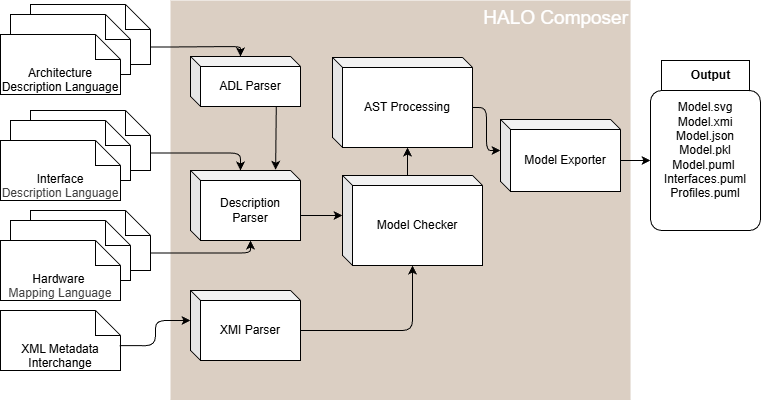
This diagram shows the main workflow and modules of the HALO composer, illustrating how models and artifacts flow through the system.
Composer Pipeline
End-to-End Flow
01
Author Models
Write DSL files or import a UML XMI model.
02
Parse
Composer parses the input files into structured IR models.
03
Compose
The composer resolves cross-references and builds one unified HALO model.
04
Validate
Check interfaces, profiles, connection semantics, and basic referential integrity.
05
Emit Artifacts
Write JSON, Pickle, DOT, SVG, PlantUML, UML XMI, and DSL artifacts.
06
Analyze
Generate a summary report of components, connections, warnings, and errors.
How the composer is called
DSL inputs:
halo compose --hadls-root "path to hadls" --output-dir "path to output directory" --include-stdlib-profiles

UML/XMI input:
halo compose --from-xmi "path to uml file" --output-dir "path to output directory"
IR - Intermediate Representation
Argument --include-stdlib-profiles is important to include the standard library of profiles built-in HALO Composer which user can reference, for in example:
- SharedMemory profiles
- BlackBoard profiles
- EventChannel profiles
Core Artifact
The Unified Model
For humans and tools
One inspectable and tool importable JSON view of the full communication architecture.
For tools
1. Pickle file with structured dictionaries for future tooling.
2. UML XMI file for integration with UML tools.
For traceability
Every generated platform or protocol artifact can be traced back to components, interfaces, and profiles.
{
  "name": "LinuxToRTOS",
  "from_component": "Core1",
  "to_component": "Core2",
  "interface": "TstIf_1",
  "profile": "sharedMemoryProfile1"
}
In practice, the model bundles components, connections, interfaces,
profiles, dataTypes, and value-domain metadata in one place.
Generation
HALO Code Generator
HALO Core Generator
Built-in plugin that generates HALO API for each target platform which contains the core functionality and abstractions.
Platform Generators
Independent plugins that generates platform-specific code for the target platform, including initialization and integration files.
Protocol Generators
Independent plugins that generates communication protocol-specific code based on the profiles used in the ADL communication description.
Platform Generators
The HALO Framework allows user to generate platform generator for the target platform, including initialization and integration files.
User can continue to develop and customize these generators based on their specific requirements.
Each platform generator is designed to work with a specific target platform, ensuring compatibility and seamless integration.
Protocol Generators
Each protocol generator covers a specific set of profiles. For example, the SharedMemory generator handles profiles that involve shared memory communication patterns.
The HALO Framework allows user to generate protocol generators as plugins, which can be developed and installed independently from the core framework.
This design allows for extensibility and customization of the code generation process to support a wide range of communication protocols and profiles.
Extensibility
HALO Is Designed as a Plugin Ecosystem
Scaffolding
CLI command "halo create-generator" can scaffold new platform or protocol generator packages with config, render logic, and Jinja2 templates.
Discovery
Generators are auto-discovered through Python entry points for platforms and for protocols.
Users can create their own generators to target new platforms or support new protocols, and the scaffolding makes it easy to get started with the right structure and hooks for HALO code generation.
Generator Creation
Scaffolding Platform and Protocol Generators
Wizard + Scaffold
CLI command "halo create-generator" runs an interactive questionnaire or accepts non-interactive flags, then routes to the scaffold factory to create either a platform or protocol generator package.
Platform Package
Platform scaffolds creates an installable Python package with python render logic and platform Jinja2 templates that add startup, integration, and target-specific support files.
Protocol Package
Protocol scaffolds creates an installable Python package with python render logic and platform Jinja2 templates for each supported platform, so one protocol can target multiple environments.
HALO Generator package
- A Python package with entry points so HALO can auto-discover the generator later.
- Python render.py as the main implementation hook where users prepare data and decide which files to generate.
- Python config.py containing generator metadata such as name, module path, output directory, and supported platforms.
- A templates/directory that becomes the main place to customize how the code will be generated.
How users expand it over time
- Edit render.py to add support for new features or modify existing behavior.
- Edit or add Jinja2 templates under src/<module>/templates/ to change emitted headers, sources, and config/build files.
- Install generator package with pip install -e . so the generator is installed and discovered.
Example commands
Interactive mode: halo create-generator
Silent mode:      halo create-generator --generator-type platform --no-interactive --name my_platform --description "My Platform Generator" --author "Your Name" --email "you@example.com" --platform my_platform
Silent mode:      halo create-generator --generator-type protocol --no-interactive --name my_protocol --description "My Protocol Generator" --author "Your Name" --email "you@example.com" --platform my_protocol --supported-platforms my_platform
HALO Generator Diagram
HALO Generator Overview
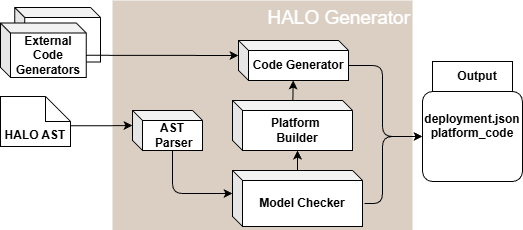
This diagram illustrates the generator architecture, showing how the unified model is transformed into platform and protocol-specific outputs.
Jinja2 + Codegen
HALO Code Generation with Jinja2
Official Jinja2 docs:
jinja.palletsprojects.com/en/stable/
1. Load + Analyze
The AST Parser loads unified model in PKL format, runs the analyzer, and selects all platforms from the unified model unless the user filters them explicitly through command-line arguments.
2. Filter Per Target
Platform builder builds a platform-scoped model containing only relevant components, connections, interfaces, profiles, structs, and communication interfaces.
3. Rendered Code
HALO renders first internal, then platform-specific and lastly protocol-specific code.
Jinja2 templates are what turns the unified model data into actual C/C++-style output code.
Extending Code Generators with templates
- Keep templates declarative and move complex computations into render.py and provide to jinja environment the necessary context.
- Use Jinja2 when you want to change output structure, naming, boilerplate, or file layout without rewriting the whole generator.
- Add new templates when a platform or protocol needs extra files instead of forcing everything into one render step.
- The unified model decides what needs to be emitted; the Jinja2 generator decides how it should look on a given target.
- Templates should contain preservation blocks which are used to not override user modifications done to the generated files. `/* HALO USER CODE BEGIN: ... */` and `/* HALO USER CODE END: ... */`
- This means users can safely place handwritten code, for in example: includes, init logic, ISR hooks, protocol extras, and declarations inside those markers without losing them on the next generate step or if generator is updated.
/* HALO USER CODE BEGIN: halo_disable_interrupts */
// user implementation stays here across regeneration
/* HALO USER CODE END: halo_disable_interrupts */
Project Integration
Existing Application Projects
Build-Time Integration
User runs halo compose and halo generate during its normal code-generation step.
Generated Package Layout
HALO emits a generated package with an include/ tree and a src/ tree. Those generated headers and sources are then added to the existing application build system.
Application-Level Usage
The existing application includes generated headers like halo_api.h, calls generated platform init functions, and uses generated typed APIs such as halo_send_*() and halo_recv_*().
What gets integrated
- Generated common HALO files such as halo_api.h, halo_cfg.h, halo_structs.h, halo_api.c, and halo_channels.c.
- Generated platform files such as halo_platform_init.h and halo_platform_init.c.
- Generated protocol files placed alongside the platform output in the same HALO layer.
- Optional custom platform/protocol generator packages installed prior to running the generators.
What remains owned by the application project
- Business logic, control loops, scheduling, services, and application-specific behavior.
- Hardware handles, RTOS objects, external buffers, interrupts, and other target-specific integration details.
- Build system wiring that compiles generated src/ files and exports generated include/ directories.
- Custom code placed inside preserved `HALO USER CODE BEGIN/END` blocks.
Representative Flow
Representative integration flow
Representative integration flow
# 1. Generate HALO layer for the project
halo compose --hadls-root "./hadls" --output-dir "./halo_out" --include-stdlib-profiles
halo generate --composer-output-dir "./halo_out" --output-dir "./generated"

# 2. Add HALO layer to the existing application build
- add ./generated/codegen/<target>/include to include paths
- add ./generated/codegen/<target>/src/*.c to sources

# 3. Use HALO from existing application code
#include "halo_api.h"
halo_core1_init_BareMetal();
halo_send_BlackBoardData_Core1ToCore2(&tx_data);
Closing
Thank You
Questions?