Appendix: Diagrams
System overview
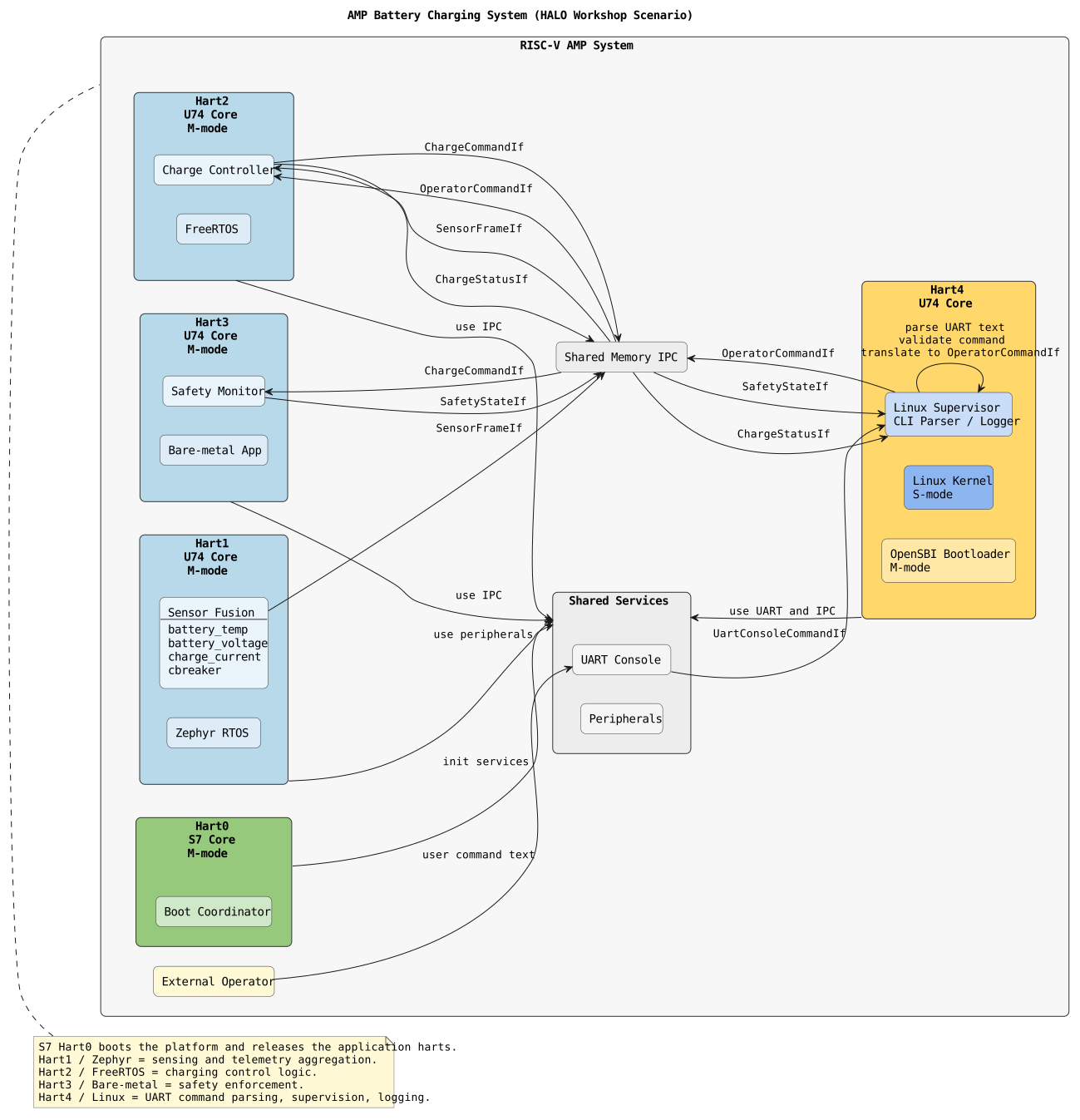
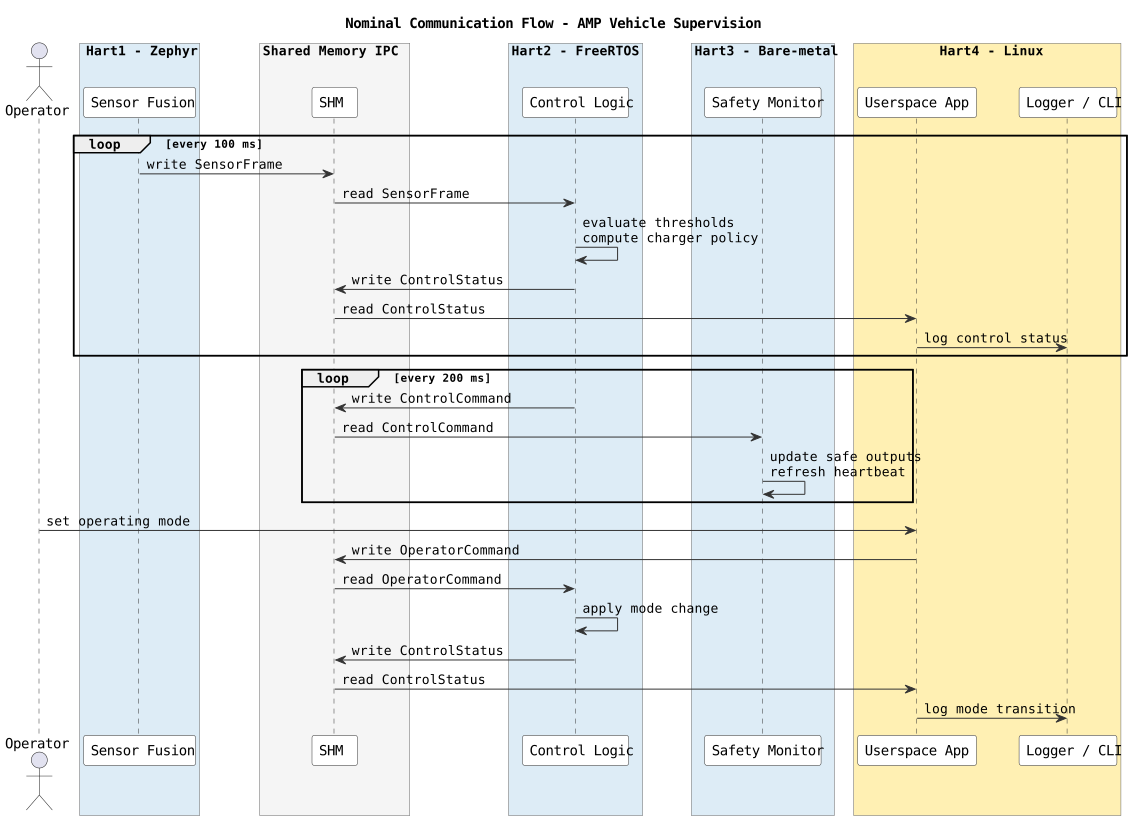
Communication flow
Scenario: AMP Battery Charging Supervision System
Implement a battery charging supervision application on the provided AMP QEMU platform using both a classical approach and a HALO-based approach.
SensorFrameIfSensorFrameIfChargeCommandIf and ChargeStatusIf at 200ms intervalsOperatorCommandIf if an operator command is receivedChargeCommandIfSafetyStateIf at 200ms intervalsOperatorCommandIf and publish it to ChargeController at 500ms intervalsChargeStatusIf and SafetyStateIf| Interface | Write by | Read by | Purpose | Physical Address Range | Virtual Address Range (Linux OS) |
|---|---|---|---|---|---|
SensorFrameIf | SensorFusion | ChargeController | periodic measurements | 0x80340000 - 0x80340200 (512 bytes) | / |
ChargeCommandIf | ChargeController | SafetyMonitor | charging command | 0x80341000 - 0x80341200 (512 bytes) | / |
ChargeStatusIf | ChargeController | Supervisor | controller status | 0x80342000 - 0x80342040 (64 bytes) | get_external_buffer(offset) |
SafetyStateIf | SafetyMonitor | Supervisor | safety state | 0x80343000 - 0x80343040 (64 bytes) | get_external_buffer(offset) |
OperatorCommandIf | Supervisor | ChargeController | structured internal command | 0x80344000 - 0x80344010 (16 bytes) | get_external_buffer(offset) |
    unsigned int battery_voltage_mv = 0;
    int charge_current_ma = 0;
    float battery_temp_c = 0.0;
    bool breaker_closed = false;
    unsigned int fault_flags = 0;
fault_flags definition (bitmask, uint32):
0x01): over-temperature0x02): over-current0x04): over-voltage0x08): undervoltage0x10): breaker open/tripped0x20): sensor invalid/stale
Multiple faults can be set at once using bitwise OR.
Example: fault_flags = 0x03 means over-temperature and over-current.
Allowed values for charging_mode: "normal", "fast".
    bool enable_charging = False
    unsigned int current_limit_ma = 0
    unsigned int voltage_limit_mv = 0
    string charging_mode = "normal"
Allowed values for charger_state: "idle", "charging", "complete", "fault".
    string charger_state = "idle"
    unsigned int requested_current_ma = 0
    unsigned int requested_voltage_mv = 0
    unsigned int fault_state = 0
    bool safe_mode = False
    bool breaker_open = False
    bool charging_allowed = False
    unsigned int heartbeat_counter = 0
    unsigned int command_id = 0
    int command_param = 0
Allowed values for command_id:
0: no-op (ignore command, keep current state). command_param ignored.1: start charging. command_param ignored.2: stop charging. command_param ignored.3: reset controller/safety state. command_param ignored.4: set mode normal. command_param ignored.5: set mode fast. command_param ignored.6: set current limit in mA. command_param contains the requested current value.7: set voltage limit in mV. command_param contains the requested voltage value.For unknown command_id values, ignore the command and set an appropriate fault or log entry.
startstopresetmode normalmode fastset_current 10set_voltage 12000SensorFrameIfChargeCommandIf and ChargeStatusIfSafetyStateIfOperatorCommandIfClassical -> HALOHALO -> ClassicalTo effectively track and manage your implementation tasks, you must use the TODO Tree extension in VS Code. This extension helps you organize and monitor your work across the codebase.
TODO Classical: X (where X is the task number)TODO HALO: XOnce your implementation is built and running, you can interact with the BMS (Battery Management System) simulation through the console PTY. Use the PTY terminal in VS Code when selecting the task QEMU Sys Run.
start — Start chargingstop — Stop chargingreset — Reset controller and safety statemode normal — Set charging mode to normalmode fast — Set charging mode to fastset_current <mA> — Set current limit (e.g., set_current 5000)set_voltage <mV> — Set voltage limit (e.g., set_voltage 12000)In the classical approach, you are responsible for implementing all Inter-Process Communication (IPC), synchronization mechanisms, and middleware infrastructure yourself. This approach provides complete control and flexibility but requires careful management of low-level communication details.
A typical classical implementation workflow:
HALO participants must create/update their HADL system description files in
/workspaces/PhdHaloRSG/halo_dist/hadls.
After adding or updating HADL files, compose and generate the HALO framework
packages using the VS Code tasks named Halo: Compose and
Halo: Generate (available in the workspace Tasks menu).
battery_charging_system.adl — Define your system architecture and components first.battery_charging_system.iddl — Specify your interface data types and structures.battery_charging_system.idl — Define the interface contracts (read and integrity are not needed) that you outlined in ADL description.battery_charging_system.hml — Add profiles that you outlined in ADL description.Use code snippets to speed up development and ensure consistency by typing ADL when you are in an ADL file, IDL when you are in an IDL file, etc.
When defining components, use the following platform names and functions:
You can name your connections, interfaces, and profiles as you like, but for consistency and clarity, I recommend using the following names that match the task sheet specifications:
Profiles are built-in — use the following directly in your HML connection definitions.
memSize, baseAddressmaxPayload, bufferSize, baseAddresseventQueueSize, maxChannels, baseAddressImportant: You can set attributes on your own, but recommended attribute values for BlackBoard and EventChannel profiles for the workshop:
Tip: HALO-specific code snippets are available in VS Code. Just type hml in a HML file or IDL in IDL file etc. Snippets are defined in .vscode/hadl.code-snippets in this workspace.
See an example HADL workflow in the Getting Started guide: Getting Started — example.